The demo that tries to do everything
When is a really great online demo, a really awful demo?
I was consulting with a company that sells billing solutions recently and got pulled in to review one of their live demo calls. The pre-sales rep knew the product inside out. The buyer had a nice clean problem that they were trying to solve, and on paper, everything looked like it was a perfect fit.
As we came toward the end of the meeting, the questions started.
Firstly, the CFO wanted to understand how the product would impact their revenue model. Then, a more general finance user asked a question about billing accuracy. And, as we moved on, IT asked something about the way that implementation would work.
The questions were all very reasonable, and each deserved an answer. So the pre-sales person did exactly what he was trained to do. He parked the questions that were off topic, and showed concise examples that answered the remaining ones.
At the end of the call, everyone has the answers that they needed.
This approach works great in a room of people where the conversation can be easily managed. The challenge that most organisations struggle with though is replicating that experience throughout the rest of the buyer journey.
That is the scaling problem.
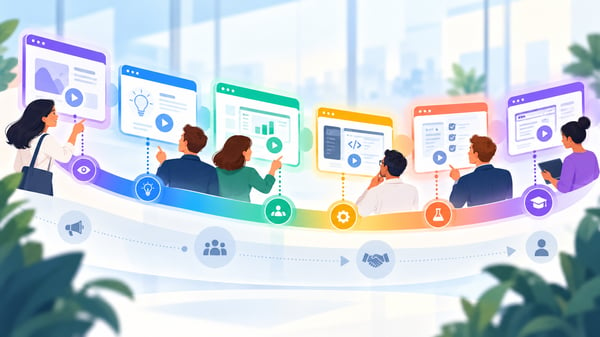
An individual interactive demo can work fantastically for one point in the buyer journey. But, when marketing wants to use it on the website, sales wants to send it before calls, and customer success wants to use it in some online training, things fall apart. The asset that worked for its original purpose is now the thing that is losing customers.
Why one demo cannot scale across the whole buyer journey
To scale interactive demos, you need to stop treating “the demo” as one asset.
A buyer does not need the same proof at every stage.
A top-of-the-funnel website visitor does not need a 30-minute technical walkthrough.
A finance director validating invoice logic does not need a glossy marketing video.
A new user after the sale does not need the CEO-level story again. They need to know which buttons to press on Tuesday morning when the billing run fails.
This is why we developed our Demo Continuum.
The continuum maps six types of demo that guide a buyer along their journey:
- Vision
- Explainer
- Use-Case
- Technical
- POC/Trial and
- Onboarding
Each demo answers a different buyer question. Each one has a different job.
When you get this right, interactive demos stop being a pile of product tours and become a system that supports marketing, sales, pre-sales and customer success without everyone reinventing the story.
The mistake is thinking scale means volume. Build more demos. Record more walkthroughs. Capture more features. That is how you end up with a library nobody trusts, nobody can find and nobody knows how to use.
Scale comes from structure and clarity.
The continuum in practice
Let’s use a billing platform as an example.
The client helps companies manage complex billing, which is becoming a much bigger issue as AI changes the economics of software. Traditional subscription billing was built for a world where you could charge a fixed amount and broadly know what the customer would cost you. In AI-heavy products, the logic flips. Every extra customer action can create a real cost. If you do not pass that cost on properly, growth can quietly eat your margin. Which is a horrible sort of success, if you think about it.
A Vision demo does not explain all of that. It should not even attempt to. Its job is to create recognition in seconds. On a homepage or product page, the buyer needs to see, at a glance, that the company handles complex, usage-based billing. A clean product image, a simplified dashboard, perhaps a small animation showing usage turning into revenue. That is enough. The buyer is not ready for the machinery yet.
The Explainer comes next. This is where the market problem gets made clear. AI products break the old subscription model because usage is no longer a neat afterthought. Billing becomes part of the business model, not a back-office admin task. The Explainer gives the buyer a reason to care about the category before asking them to care about the product.
Then the Use-Case demos split by persona.
The CEO cares about whether they can create and defend new revenue models. The finance lead cares about capturing usage correctly and producing invoices that will not trigger awkward customer emails. IT cares about how the billing platform connects into the product, the data flow and the systems already in place. Same product, different anxieties.
This is where interactive demos are strongest. A good Use-Case demo is short, self-guided and built around the buyer’s workflow. It does not say, “Here are twelve things our platform can do.” It says, “Here is how someone like you solves the problem you already know you have.”
The Technical demo then goes deeper. Now you can show how billing models are configured, how workflows are set up, how exceptions are handled and where integration points sit. This is still not the place for the big overview. The technical session exists to prove the product against a specific customer requirement.
Then comes the POC, or proof of concept demo. This is where the buyer tests the platform against their own model and sample customer data. But these days, that doesn't have to be an open sandbox. Certainly not a “have a play and let us know what you think.” That is just asking for failure. A proper POC demo captured the agreed success criteria, but using the customer's systems and data. It says, “Here is what we need to prove, and here is how we will know we have proved it.” Record that in interactive form and you have a PoC that the CxO will actually get involved in.
Finally, Onboarding turns the sale into adoption. Finance or operations users need to know how to run the system day to day. They need concise training demos that help them repeat the outcome every week. The story has changed shape by now. It is no longer a market narrative. It is a task path.
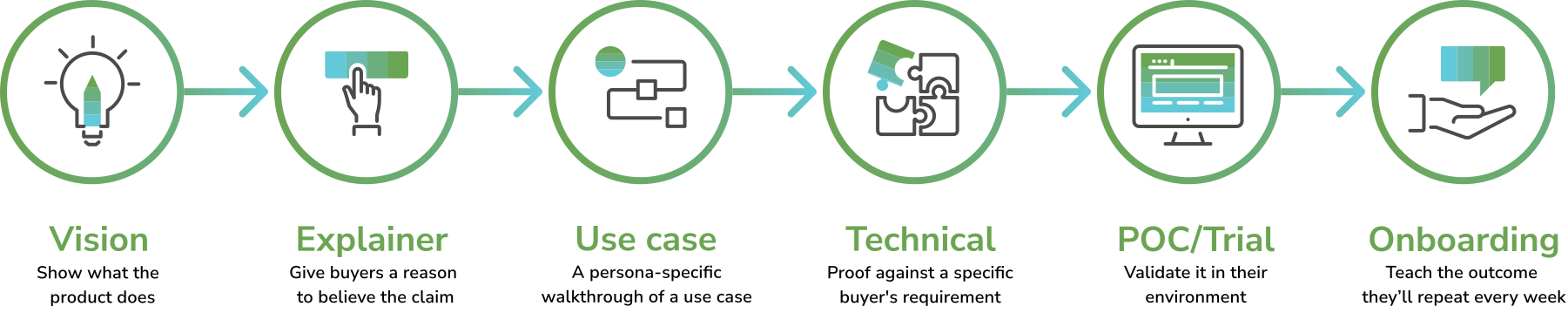
That is how the continuum works. The same product, six different demo jobs.
A second example, because software is never tidy
Take a creative design platform.
At the Vision or Use-Case stage, it may be enough to show that a user can create polished outputs quickly. Different layouts., slide-based formats, social media sizes, a library of reusable assets, etc. Your buyer gets the point without needing to understand every button and panel in the interface.
The Technical demo is different. Now you might actually show layout controls, templates, asset flows and export options. If the buyer works in a regulated environment, the live demo may focus almost entirely on accessible PDFs, tags behind images, or how you set up the reading order so screen readers know what comes next.
The clever bit is not showing that the product has lots of features. It's showing the right features to prove to your buyer that you can meet their requirements.
And that is what most interactive demos miss.
They mistake covering every feature for giving the buyer a reason to buy.
Great demo, or awful demo?
So, when is a really great online demo, a really awful demo?
The answer is, when it tries to do too much.
The practical rule is simple:
Each demo must know its place, and each feature must earn its place.
A Vision demo earns attention. An Explainer earns belief. A Use-Case demo earns a qualified conversation. A Technical demo earns confidence. A POC earns a decision. Onboarding earns adoption.
Once you see it that way, scaling becomes much less mysterious. You are not building more demos for the sake of it. You are building the missing proof at the point where the buyer needs it.
That is the difference between a demo library and a demo system.
If this sounds uncomfortably close to home, it is the sort of thing we help sort out at Demodia. We map the continuum, find the gaps and overlaps, then build and operate the demo estate so buyers get the right proof at the right moment.
Book a demo healthcheck and we’ll take a look together.